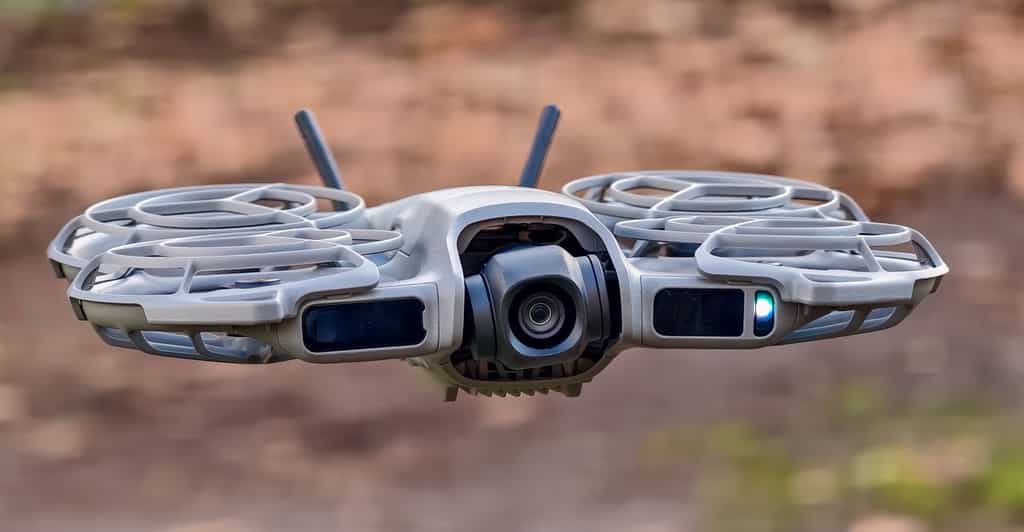
I’m not a drone guy. In fact, I’ve always been a bit nervous to play around with them too much. They’re big, fragile, and expensive, which is a dangerous combination for someone with my hand-eye coordination. But I’ve always sort of wanted one, mostly because I’ve been jealous of the mid-air photos and videos I’ve seen other people pull off.
DJI has been trying to make the smaller, simpler, cheaper drone to win over people like me for a while. It nearly got there with the $199 Neo, but that was held back by basic obstacle avoidance and odd omissions like no portrait video recording. The fold-down Flip benefits from more advanced features, but at $439 is too expensive for first-timers like me, and rival HoverAir’s X1 isn’t much cheaper at $349.
The Neo 2 solves those problems. At £209 / €245 (around $280 — though there are no realistic hopes of a US launch now that DJI has been banned from the country) it’s pricier than the Neo, but still undercuts other rivals, and benefits from camera upgrades and improved, though by no means perfect, obstacle detection. It’s small and light enough to fly almost anywhere without worrying too much about complex regulations, can capture great footage and photos without the need for any controller at all, and has the manual control and FPV flight options needed to double as both toy and flying camera.
Sure, it has its limits. More powerful drones might have better cameras, faster speeds, or longer battery life, and there’s a place for all of that. But that’s not where I am right now, and if you’re not either, then the Neo 2 is probably all you need. It’s an affordable, low-risk way to figure out that flying a drone is pretty damn fun.
The first thing I did was throw the Neo 2 in my backpack and head out for a run, leaving the controller at home and my phone in my pocket. Let’s call this the “drones for dummies” use case, and it’s fittingly at about my level.
At 151g, or 160g with the optional extra transceiver attached, the Neo 2 is a little heavier than the first Neo, but still light enough to carry around pretty easily. Plus, it’s well below the 250g line that serves as the cutoff for more onerous restrictions and regulations in many countries.
It takes a couple of button presses to turn the Neo 2 on, and from there the on-device controls are simple: two buttons on the side cycle through the drone’s default automatic flight options, while a long press lets you adjust parameters like the drone’s height, distance, or filming angle. Then you hold the drone flat in your hand, tap the dedicated start button, and it’s off.
The Follow mode is the one likely to get the most use, and it does a great job. You get plenty of control over the Neo 2’s positioning, distance, and angle, and while the top speed of 12m/s (about 26mph) is slow compared to larger drones, it’s fast enough to comfortably keep up on a run — though may lag behind on faster bike rides.
Obstacle detection is the other reason it may lose you, and you will have to keep an ear out for any telltale changes in the whine of the propellers. I made a point of walking and running amongst trees, and while the Neo 2 could confidently reroute around the trunks in its path, it did occasionally get caught up in low-hanging branches, spindly and hard to spot without any winter foliage. The first time this happened it clattered about a bit, got itself free, and quickly corrected course to find me again; the second time it couldn’t escape and simply shut its propellers down, stranded in the tree, leaving me to pluck it out of the branches. I was able to break the tracking by hiding behind an especially large tree trunk, at which point the Neo 2 hovered in place, unable to find me, but if you’re not actively trying to trick the drone it does a good job keeping you in its sights.
Thankfully, the Neo 2 is tough enough to survive a little rough and tumble, despite the lightweight build. It ships with removable propeller guards attached, and despite a couple of crashes and collisions during my testing there’s not even a scratch or scuff on the body so far. There’s no waterproofing — so you’ll want to keep this out of the rain — but beyond that I haven’t felt the need to be overly precious with it, chucking it loose in my gym bag and trusting it to survive just fine. I’m just a little nervous about the transceiver antennae, included in the Neo 2’s more expensive bundles, and wish it didn’t require four screws to detach for safekeeping, but so far their little bit of flex seems to have kept them safe.
Beyond Follow, the other automatic options are more focused on quick photos and videos. There’s the Dronie, where it flies backwards and upwards as it films for a few seconds; Rocket, where it films while shooting up and back down; or Circle, which you can probably figure out. There are more options besides, and you can use the DJI Fly app to customize which are available directly from the drone shortcuts.
Video quality benefits from modest improvements on the original Neo. The camera uses the same half-inch-type sensor size and 4K resolution, improved by a wider f/2.2 aperture and a jump from 30fps to 60fps when filming in 4K, or 100fps for slow-mo. It also moves to a higher 2.7K resolution at 60fps for vertical video, having previously been limited to 1080p.
The Neo 2 isn’t really going to compete with larger or more expensive drones when it comes to the camera, and it especially struggles with highlights, whether that be direct bright light or over-exposing my (admittedly pale) skin. But that’s hardly the point — this is about as small as your phone, as easy to use, and shoots video at comparable quality, and it does all that while hovering in the air, following you about the place, which your phone probably doesn’t.
You can even control the drone directly without reaching for your phone, thanks to built-in gesture controls. They’re simple enough — telling the drone to raise, lower, back away, or land in your palm — but I did actually find myself using them, which wasn’t what I expected from the outset. There are basic voice controls too, though since you need your phone in-hand to pick up your audio, you might as well just use the touchscreen controls.
For those, you can control the drone directly from the DJI Fly app, or using a remote like DJI’s RC-N3, which is included alongside two spare batteries in DJI’s £349 / €405 (around $470) Fly More Combo, almost doubling the price of the drone alone. You can choose between the regular flight mode, a slower Cine option, or faster Sport mode, and can also decide how you want the Neo 2 to handle obstacles: stop in front of them, automatically fly around them, or just turn off obstacle detection altogether and take matters into your own hands.
There’s FPV support too, though DJI didn’t send me the goggles and motion controller included in its £509 / €589 (about $680) Fly Motion Combo to test that out for myself — but my colleague Sean Hollister wasn’t sold on the included Goggles N3 when he tested them alongside the first Neo a year ago.
Given its size, I worried the Neo 2 would feel slight when piloting it about, but it feels surprisingly nippy, and the 2-axis stabilization acquits itself well. On a blustery London day the drone did have to fly at quite a noticeable slant to stay steady in the wind, but steady it was, only getting blown about as it slowed down to land, prompting me to grab it out of the air just to be safe. In regular flight the footage comes out remarkably steady even when the drone itself was teetering at an angle, though more complicated effects can suffer — a dolly zoom in the same conditions came out jerkily nauseating.
I tried to head off a few other potential threats so you won’t have to. Fly it out of range (I hit issues around 120m/400ft using the phone as a remote, though range will be longer using the transceiver and a proper RC) and the video gets choppy before a big error message pops up, prompting the drone to automatically attempt to fly back to where it took off from.
You’ll want to be careful where you take off from too, as it might affect the Neo 2’s ability to safely return to that spot for landings. Take off from under a tree and the drone might return to that spot in a high arc, something I spotted was happening just in time to hit cancel before the drone tried to descend through the branches at the very top, far out of reach of a rescue. Perhaps I was overcautious, and the Neo 2’s omnidirectional obstacle avoidance would have reacted in time, but after already fishing it out of the lower branches of a tree once, I didn’t fancy taking the risk of it getting stuck 30ft up.
Then there’s battery life. The Neo 2 can fly for 15-20 minutes on a full charge, though for safety it’ll try to initiate an emergency landing before the battery percentage hits single digits, meaning the practical runtime will be at the lower end of that spread. If that doesn’t sound like much, you’ll probably want to buy a couple spare batteries, which are included alongside the remote control in DJI’s Fly More Combo.
The drone doesn’t need — and in fact, can’t use — an SD card for storage. Instead it includes 49GB of storage space, more than double the 22GB of its predecessor. The 15 minutes or so of 4K test footage I’ve recorded so far, plus a few photos, have used up just 6GB of that, meaning you can probably expect to shoot a couple hours’ worth before needing to transfer files elsewhere.
The biggest downside to the whole experience is probably the DJI Fly app you manage the drone through. It’s a little awkward to use, at least on Android. It insists on landscape mode when you open it, but huffily tells you to switch to portrait whenever you enter the flight controls, video editor, or safe flight zone map. The interface is cluttered, clunky, and difficult to navigate, and offers no help at all on basic tasks like connecting to the RC controller.
It’s even annoying to get hold of: Android users will have to download this directly from the DJI website, since it isn’t in the Google Play Store, and while iPhone owners can find it in the App Store for now, I’m not sure that will last once the US ban kicks in.
More advanced drone owners are likely to bristle at the Neo 2’s limits, but as a compact, fly-anywhere option that almost anyone can operate, it excels. Am I a drone guy now? I’m not about to drop a grand on a high-end FPV model, but the Neo 2 made me realize I don’t need to — for now, this is all the drone I need.
Photography by Dominic Preston / The Verge.
Follow topics and authors from this story to see more like this in your personalized homepage feed and to receive email updates.
Editorial Context & Insight
Original analysis and synthesis with multi-source verification
Methodology
This article includes original analysis and synthesis from our editorial team, cross-referenced with multiple primary sources to ensure depth, accuracy, and balanced perspective. All claims are fact-checked and verified before publication.
Primary Source
Verified Source
The Verge
Editorial Team
Senior Editor
Shiv Shakti Mishra
Specializes in Technology coverage
Quality Assurance
Associate Editor
Fact-checking and editorial standards compliance