

Key takeaways
- Google’s AI models may not be in the lead by most measures right now, but the company does have one key advantage: your data.
- CC is an evolution of something that Google announced back in 2025.
- Google says that CC has its own Google account, allowing each family member to interact with it (or not) as they choose.
What happened
Google’s AI models may not be in the lead by most measures right now, but the company does have one key advantage: your data. If you’re deep in the Google ecosystem, Gemini models have a lot of context on you already. Google’s latest Google Labs experiment, known as CC, aims to expand that kind of customization to the whole family.
The end goal is to hand off tedious tasks to the AI, be that managing your calendar or filling out school permission slips that show up in your email. So maybe the robot fills out almost all of the form without being asked, but it checks with the user about other details as needed. However, CC won’t send the document or anything else to addresses outside the group without confirmation.
Google says that each instance of CC runs on an isolated cloud instance, powered by Antigravity and the company’s latest Gemini models. 8 Flash. There hasn’t been a new Pro model since early this year despite Google promising one at I/O. It’s unclear how good CC will be at pulling together a family’s data and taking useful action without burning through a mountain of AI tokens.
Why it matters
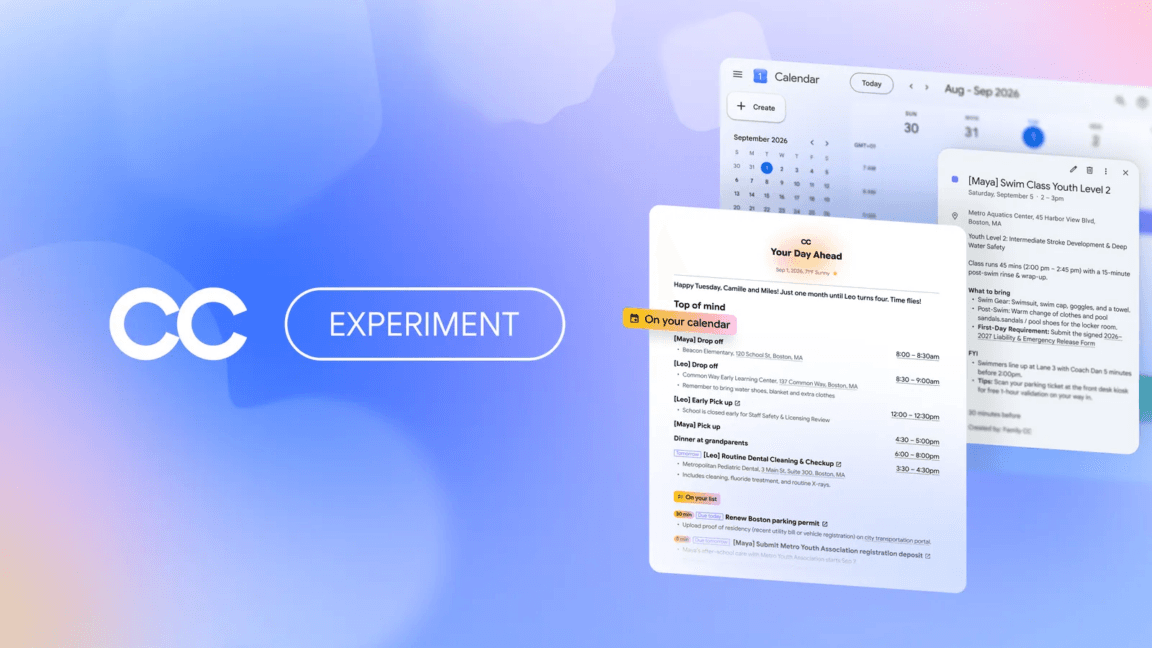
CC is an evolution of something that Google announced back in 2025. The original CC eventually became Gemini’s Daily Brief, which churns through the data in your Google account to offer daily action items and suggestions. The new CC has a similar goal, but it’s designed to be a shared resource for up to six users in a family.
Google says that CC has its own Google account, allowing each family member to interact with it (or not) as they choose. For example, CC only sees emails from its connected users if they are explicitly shared. You can do that by designating certain addresses as always available to the agent—something like school scheduling emails. You can also send content to CC via email or Google Chat.
The agent can even monitor a shared Google Drive folder, into which you can dump invitations, documents, and other content. One of CC’s main functions is, unsurprisingly, a lot like Daily Brief. Each morning, all the registered users will get a shared “Your Day Ahead” email that pulls together the day’s events and updates on previous tasks.
It can also add items to shared calendars, remind you about important tasks, and create documents based on your instructions that are accessible to all CC users. As everyone uses CC more, it builds a memory of who you are and how you like to do things.
What to watch
And CC isn’t even tied to Google’s paid subscriptions. If you want to try CC, you can sign up for the waitlist now. Anyone who was using the earlier version of CC that became Daily Brief will be upgraded to the new experience in the coming days. Google notes that CC is only compatible with personal Gmail accounts for those 18 or older.
So, functionally, this is an agent for parents to manage a busy household rather than one that kids will interact with. The latter comes with a lot of legal baggage that Google probably doesn’t want to accommodate for a Labs experiment.