


Key takeaways
- The relatively recent rise of AI-assisted coding tools and the whole concept of “vibe coding” have effectively upended entire software…
- While these tools have been available to novice coders willing to put in the work to set them up, those with little to no coding experience…
- Pocket—which launched in the US last Friday, August 21, after Meta acquired the staff behind the now-defunct vibe-coding app Gizmo in…
What happened
The relatively recent rise of AI-assisted coding tools and the whole concept of “vibe coding” have effectively upended entire software development workflows.
While these tools have been available to novice coders willing to put in the work to set them up, those with little to no coding experience could still be a little put off by the CLIs, IDEs, and terminal-based tinkering needed to create a complex AI-coded project these days. Meta’s latest AI-based project launch wants to make that kind of vibe coding as instantly accessible as posting on social media.
Pocket—which launched in the US last Friday, August 21, after Meta acquired the staff behind the now-defunct vibe-coding app Gizmo in March—is a mobile app that lets users create fully functional interactive “gizmos” just by typing prompts into a text box, without even the option to look at a line of code.
Those gizmos can then be shared with the world in a TikTok-style endless scroll complete with likes, comments, reposts, and all the other hallmarks of social media addiction. After playing around with Pocket for the better part of a week, I found myself getting hooked on the simple process of quickly standing up functional, relatively feature-rich game prototypes simply by chatting with an LLM.
But the result of all that time and AI effort is a couple of interactive toys that are effectively trapped in Meta’s new walled garden, without any real way to turn them into something separate.
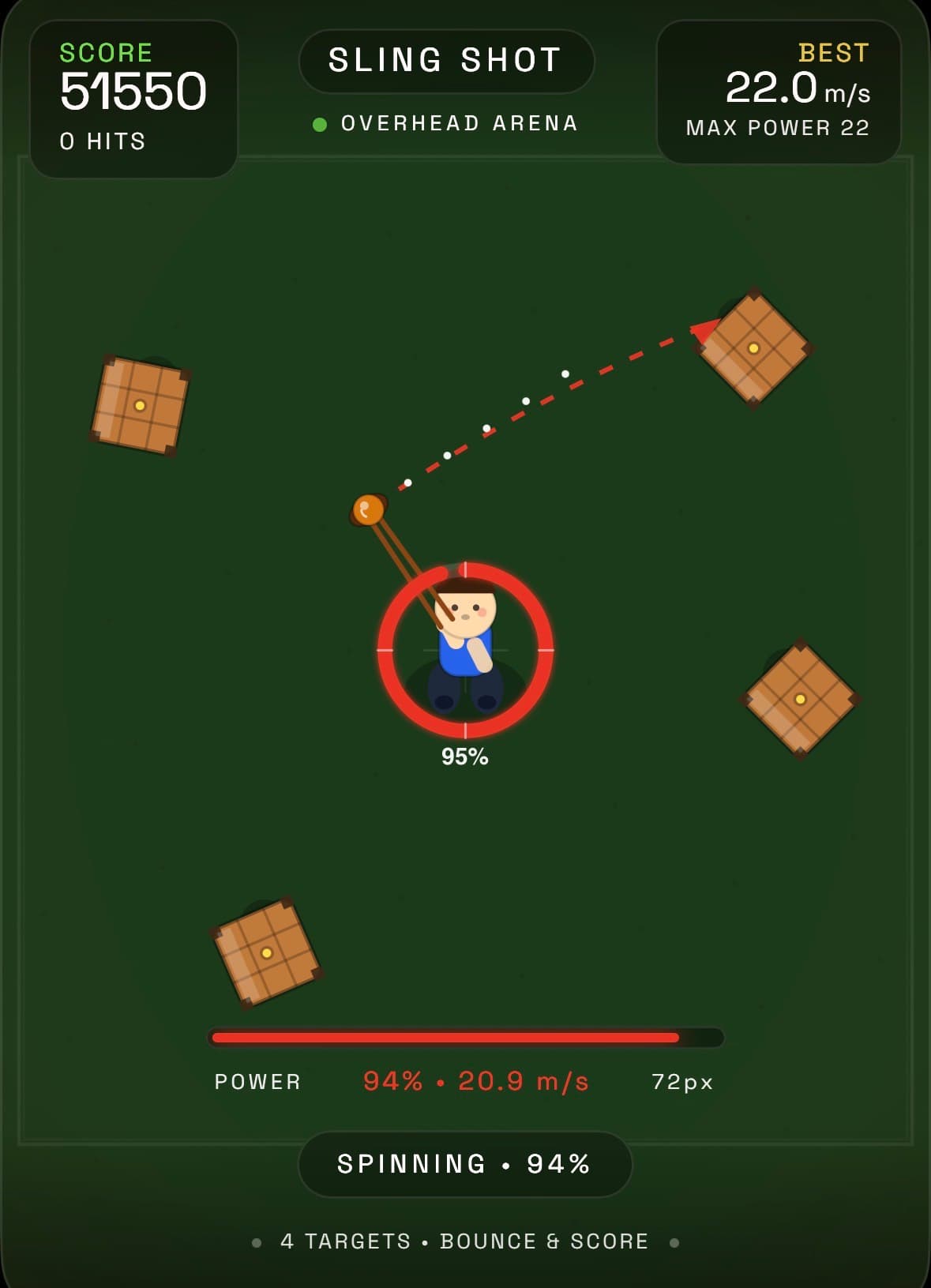
To start creating with Pocket, all you have to do is type into a large, friendly-looking text box labeled “Describe an idea…” After a few false starts, I centered my first real Pocket project on the idea of a game where you tap and hold the phone screen to spin up a sling, then release it to fling a tangential shot at encroaching hordes of enemies.
After submitting the prompt and waiting nearly two minutes, I was surprised at how quickly and accurately Pocket had matched my general vision. What would have taken a novice lapsed coder like me hours of time struggling with physics models and code references was already in a functional, ready-to-test state with minimal effort.
Pocket even added a few explodable hay bale targets that I hadn’t asked for, as well as fringe UI features like a score counter and on-screen power meter that I can only assume the model’s training data suggested were probably welcome additions. With that initial prototype in hand, I dove into hours of vibe-coded tweaks.
Over more than 100 prompts, I started refining the basic “sling shot” control idea into something more akin to a full game. I asked for robots to march in from the edge of the screen, then asked for new types of robots for variety. I asked for an ammo system, then asked for it to be removed in favor of a minimum “sling speed” that effectively prevents shot spamming.
I asked for items and an electric fence around the player and endless small edits to the scoring system and sound effects and sling speed and enemy patterns and features large and small. When that project was in decent shape, I found myself jonesing to keep creating using the AI.
I started almost right away on a simple arcade-style juggling game, with colorful balls that you have to keep up by bouncing them off paddles controlled by your thumbs. Over a few more hours, I tinkered with adding an array of items, a complex score-multiplier system, and a set of end-of-game graphs to track progress.
At this point, I have vague memories of fighting to get even simple computer programs to do anything useful as I worked toward my college computer science degree. Compared to that, the process of making games with Pocket felt a bit magical.
All I had to do was think of a new feature I’d like to test, and Pocket had a version of the game ready with that feature about a minute after I typed it in. A majority of the time, the result of a prompt was exactly what I was hoping for, with no need for additional tweaks.
Only a handful of prompts resulted in Pocket seeming to completely ignore my request or breaking the game entirely, in which case a single tap could revert to the last version and let me try again. Sometimes I tried to be relatively detailed in my prompts, specifying exactly how I wanted a score multiplier to work or tweaking a percentage-based threshold for shot power, for instance.
Other times I would leave my prompts relatively short and vague—“add collision detection to the small balls” or “add a bit of oomph to the lost ball sound effect,” for instance—and find that Pocket had interpreted what I meant with surprising acuity. Pocket also features an “Ideas” tab that can suggest prompts that add entire feature sets before you’ve even thought of them.
Why it matters
A minority of the time, I needed to work through a few additional prompts to clarify what I meant or tweak the look or behavior of a feature that worked better in theory than in practice.
What to watch
These ideas were pretty hit or miss, with many that made no sense for the game I was making or that replicated features that were already part of the game (sometimes in a worse way).
But some of Pocket’s ideas, like adding key presentational effects or fun new gameplay variations that I hadn’t even considered, led me to a bit of an existential crisis about how necessary I really was to this whole process at all. Creating simple games exclusively through AI prompts has its pitfalls.